
Search Nashville Police Records
Nashville police records help you find incident reports, arrest details, crash reports, and open data tied to city calls for service. The best path depends on what you need and how old the record is. Some records sit with the Metropolitan Nashville Police Department, while others sit with Davidson County offices or the county courts. If you want a public copy, start with the city request portal, then move to the county file or court record when the police summary is not enough. The steps are simple once you know which office holds the record.
Nashville Quick Facts
Nashville Police Records Search
The Metropolitan Nashville Police Department runs the main city police site, and that is the best place to begin a search. The department also uses a public records portal for requests that need a formal intake path. If you want a quick look at recent incidents, the city keeps an open data incidents page and an active dispatch feed.
Those tools serve different jobs. The open data page is good for broad pattern checks. The dispatch feed shows live activity. The portal is better when you need a copy that can be saved, printed, or routed to the right records staff. If you are trying to find Nashville police records for one event, start with the dispatch or incident data, then move to the request form when you need the full file.
Where to Find Nashville Police Records
Nashville police records do not all sit in one place. The police department handles report access, but Davidson County also keeps jail and court records that often connect to the same case. That means one search can lead to several offices. A booking record may sit with the Davidson County Sheriff's Office, while the court file sits with the criminal court clerk. Each office adds a different piece to the paper trail.
The city explains its request path on the official help page at How do I request a police or incident report. That guide is useful when you want to know which form to use, where to send it, and what kind of ID the city may ask for. It is also the best place to check before you go in person.
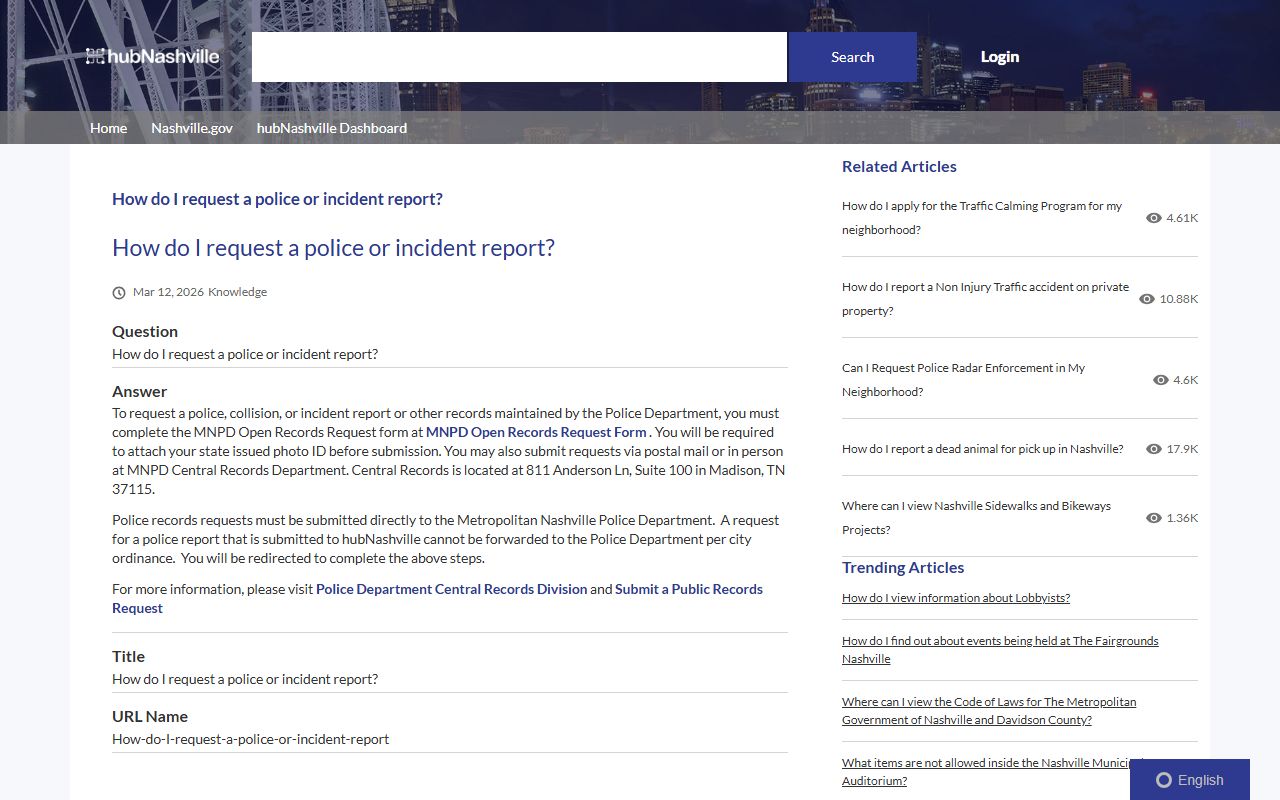
The request guide gives you a clean starting point. Use it when you need a police report, an incident summary, or a path toward a public copy. Then match the office to the record. That keeps you from wasting time at the wrong counter.
Nashville Police Department Records
MNPD records can include incident reports, accident reports, arrest reports, and other city police files. Some records are easy to spot in the open data feed. Others need a formal request because they contain names, addresses, or case notes that are not shown in the live data view. The department notes that active investigations may stay closed for a time.
The police department page is also the right place to confirm where the records unit sits now. Nashville keeps central records at 811 Anderson Lane, Suite 100 in Madison, while the main department address is 600 Murfreesboro Pike. Those two locations serve different jobs. The records side helps with copies and request intake. The police side handles the department's broader public contact and service pages.
When you need a current picture of police activity, the open data incidents page can help you spot the time, place, and type of event. The active dispatch page is more immediate. It shows calls as they move through the system. Use both together when you are trying to see whether a record is recent, still open, or already settled into the archive.
Note: Public summaries are useful, but they are not the same as the full file. A request can return more detail, yet active cases and juvenile material may still be withheld or trimmed.
Davidson County Police Records
Davidson County matters because Nashville is a consolidated city-county government. Many arrests tied to city police work move into county jail and court records fast. The Davidson County Sheriff's Office keeps inmate and jail information, and the recent bookings page is the fastest way to see who was just booked. That does not replace a police report, but it helps connect the person to the case.
For case records, the Criminal Court Clerk portal is the next stop. That site can help when a Nashville police record leads to a criminal case, bond issue, or court date. The clerk file and the police file are different records, yet they often tell the same story from different angles. If one file is thin, the other may fill in the gap.
County records also help when you need to sort out which agency had the person at a certain time. A city report may show the arrest. The county booking page may show the intake time, bond, and release status. Put those pieces together and the case becomes much easier to track.
Public Access to Nashville Police Records
Tennessee law gives broad access to public records under T.C.A. § 10-7-503. That rule covers records kept by state, county, and city offices. In plain terms, Nashville police records are often open for review unless another law blocks part of the file. The city still may redact private details, active investigative material, or juvenile information.
The main rule is simple. Public access is broad, but not unlimited. A record custodian can remove data that would expose a minor, a victim, a private account number, or a live investigative lead. The best approach is to ask for the record you need, then accept that you may get a redacted copy rather than the full raw file. That is normal in police records work.
When you want a wider view of the rules, the state statute summary on the Tennessee public records statutes page gives a clean explanation of how access works. It is useful when you need to understand why one file is open and another is not. Note: the law favors access, but it still protects sensitive data and records tied to active law enforcement work.
How to Request Nashville Police Records
To request Nashville police records, start with the MNPD open records portal and the city help page. The department says you should complete the request form and email it with a photo ID to the public records address listed by the city. That path works best when you want a report copy, a police summary, or another record that needs staff review.
The city also says some requests are faster than others. Simple items can move quickly, while older files, large report sets, or records with privacy review can take more time. If you are in a hurry, use the official request path first, then follow up with the records unit if the case number or event date is not enough on its own. Good details save time.
You can also use in-person help when the online route is not enough. Bring the full name, date of the event, and any case number you already have. If you are asking for a crash report or a police report tied to a specific call, that detail helps the records staff find the right file. The more exact you are, the cleaner the result will be.
Nashville Police Records Fees
Fees depend on the record type. The city says accident reports cost $6, while other request fees vary by record and review time. That means a basic online search may be free, but a copied report or certified file can cost more. If you need the exact price, ask before you submit a large request. It saves delay and cuts down on guesswork.
County records can also carry their own copy costs. That matters when a police record points you to a jail file or a court file. A small search can turn into a few separate copies, each with its own charge. If you only need proof that a record exists, the summary may be enough. If you need the full paper trail, expect a higher bill and a longer wait.
Keep your request narrow when you can. One event, one date, and one named person are easier to price and process than a wide search. If the first search turns up the wrong case, refine it before asking for more pages. That keeps Nashville police records work focused and keeps the cost down.
Nashville Police Records and Courts
Police records often lead to court records, and that link matters in Nashville. Once an arrest turns into a criminal case, the clerk's office becomes part of the search path. Court files can show charges, settings, bond changes, and case outcomes that do not always appear in the police summary. If you only use the police file, you may miss the final step in the case.
This is why many people use Nashville police records as a starting point, not the end point. The city record can tell you who responded and when. The county and court records can tell you what happened next. Put them together and you get a clearer record of the event, the booking, and the case result.
If you are building a full picture, keep the city request page, the police portal, the booking search, and the court portal in the same workflow. That gives you one clean path for Nashville police records and a second path for the county case file when the city record is not enough.